
Choosing the right Transportation Management System (TMS) can save you time, reduce mistakes, and help you cut shipping costs. But with so many options, it’s easy to pick the wrong one. This quick guide will help you understand what a TMS does, what features matter, and how to choose a system that fits your budget and shipping needs without unnecessary complexity.
Table of Content:
- What Is a TMS and How Does It Actually Work?
- Why Do Small and Budget-Focused Businesses Need a TMS?
- What Problems Can a TMS Solve in Daily Shipping Operations?
- What Features Should You Look for in a TMS?
- How Much Visibility Do You Really Get with a TMS?
- Should You Use a TMS Yourself or Work with a Logistics Partner?
- How Easy Is It to Integrate a TMS with Your Current Process?
- What Mistakes Do People Make When Choosing a TMS?
- How to Choose the Right TMS Step by Step?
- How Can YK Freight Help You Simplify TMS and Shipping?
What Is a TMS and How Does It Actually Work?
A Transportation Management System (TMS) is a tool that helps you organize and control your shipping in one place. Instead of juggling spreadsheets, emails, and calls with carriers, a TMS brings everything together.
If you’re buying cars from auctions and arranging delivery, a TMS helps you plan shipments, choose carriers, track vehicles, and manage documents without confusion. It saves time and helps avoid costly mistakes.

How does a TMS work in simple terms?
Think of a TMS as your shipping dashboard.
You enter shipment details — for example, picking up a car from an auction yard and delivering it to a port or your location. The system then helps you:
- find available carriers
- compare prices
- book the shipment
- track the delivery in real time
- store all documents in one place
Instead of guessing where your car is or calling multiple people, you can see everything clearly in one system.
Can you use a TMS on your own?
Yes, you can manage everything yourself using a TMS. This works well if you already understand the shipping process and have time to handle daily operations.
But here’s the reality: many budget buyers start this way and quickly get overwhelmed.
For example, you might be tracking 3–5 vehicles at once. At first, it feels manageable. But then delays happen, carriers change schedules, and paperwork starts piling up. Without experience, small mistakes can lead to extra costs.
What if you don’t want to manage everything yourself?
This is where a logistics partner like YK Freight comes in.
Instead of just giving you the software, they can operate the TMS for you. That means they handle booking, tracking, communication with carriers, and problem-solving.
You still stay in control — you decide:
- where to ship
- how often
- your budget
- how involved you want to be
YK Freight simply acts as your outsourced shipping team, following your instructions while handling the heavy lifting.
Do you lose control if you outsource TMS operations?
No — and this is a common concern.
Even if someone else manages the system, you still have full visibility. You can check shipment status, review costs, and track progress at any time.
For example, if you're shipping cars regularly, you can:
- monitor all deliveries in one dashboard
- approve or adjust shipments
- see where delays happen
- understand your real shipping costs
You’re not giving up control — you’re just saving time and avoiding stress.
Why does this matter for budget-focused users?
If you’re trying to save money on car shipping, every mistake counts.
A missed update, wrong carrier choice, or lost document can easily cost hundreds of dollars. A TMS helps reduce these risks by keeping everything organized and visible.
Why Do Small and Budget-Focused Businesses Need a TMS?
For small businesses and budget buyers, shipping is often where money quietly disappears. At first, costs seem simple: pay for transport, receive the car, done. But in reality, there are many hidden expenses that are easy to miss without proper tracking.
A Transportation Management System (TMS) helps uncover these hidden costs and gives you full visibility over every step of the process.
What are “hidden shipping costs”?
Hidden costs are extra expenses that don’t show up right away but add up over time. These can include:
- delays that lead to storage fees
- last-minute carrier changes with higher rates
- missed documents causing penalties
- inefficient routes that increase fuel costs
- overpaying because you didn’t compare options
When you manage shipments manually, these issues are hard to track. You might only notice the final number — not where the money was lost.
Why do people underestimate shipping expenses?
Many beginners rely on simple tools like spreadsheets, notes, or even memory. This works for one or two shipments, but quickly breaks down as volume grows.
For example, you might think:
“I paid $800 for delivery — that’s my total cost.”
But in reality:
- $150 went to storage due to a delay
- $100 extra was paid because the carrier changed
- $50 was lost due to poor coordination
Now your real cost is $1,100 — and you didn’t even realize it.
Without a TMS, these numbers are scattered across emails, calls, and invoices. There’s no clear picture.
A real-life example: losing money without visibility
Imagine a buyer who regularly purchases cars from auctions and ships them to a port.
At first, everything seems under control. They manage 2–3 shipments per month using spreadsheets. But as they scale to 8–10 cars, problems start showing up:
- one car arrives late and sits at the yard for days
- another shipment gets reassigned to a more expensive carrier
- documents for one vehicle are missing, causing delays
Because everything is tracked manually, the buyer doesn’t notice the pattern. At the end of the month, profits are lower than expected — but it’s unclear why.
This is exactly where a TMS makes a difference.
How does a TMS solve this problem?
A TMS gives you full visibility in one place. You can:
- track every shipment in real time
- see all costs clearly, not just the base price
- compare carrier rates before booking
- catch delays early and react faster
- store all documents without losing them
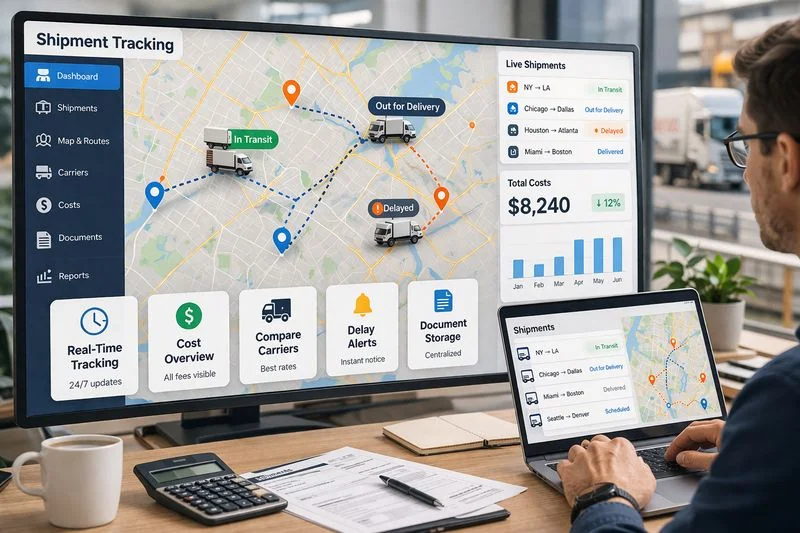
Instead of guessing, you see exactly where your money goes.
Why does this matter even more for budget-focused users?
If you’re working with tight margins, even small losses hurt.
Saving $100 on a car purchase doesn’t help if you lose $300 during shipping. A TMS helps protect your budget by reducing mistakes and giving you control over costs.
What Problems Can a TMS Solve in Daily Shipping Operations?
Daily shipping can quickly become messy, especially if you’re handling multiple vehicles at once. Small issues turn into expensive problems when there’s no clear system in place. A Transportation Management System (TMS) helps fix the most common pain points by putting everything in one place.
Why do missed deliveries happen so often?
Missed or delayed deliveries are usually not random — they happen because of poor coordination.
For example, a carrier arrives late, the pickup window is missed, and the vehicle sits at the auction yard for extra days. This leads to storage fees and schedule disruptions.
With a TMS, you can:
- track shipment status in real time
- get updates on delays early
- adjust schedules quickly
Instead of reacting too late, you stay ahead of problems.
Why are shipping costs often unclear?
One of the biggest frustrations is not knowing your real costs until it’s too late.
You might agree on a price, but then:
- extra fees appear
- routes change
- additional handling costs are added
When everything is spread across emails and invoices, it’s hard to see the full picture.
A TMS brings all costs into one dashboard. You can:
- compare carrier rates before booking
- see total costs, not just base prices
- track where extra charges come from
This makes it easier to control your budget and avoid surprises.
What’s the problem with using too many spreadsheets?
Spreadsheets seem simple at first, but they don’t scale.
You might have:
- one file for shipments
- another for costs
- emails for updates
- notes for tracking issues
Very quickly, things get out of sync. One wrong entry or missed update can cause confusion or mistakes.
A TMS replaces scattered tools with a single system. Everything is updated in real time, so you don’t have to double-check multiple sources.
Why is communication with carriers often a mess?
When you rely on calls, texts, and emails, communication becomes inconsistent.
You might:
- wait hours for updates
- get unclear information
- miss important changes
This is especially frustrating when you’re trying to track multiple shipments at once.
A TMS improves communication by centralizing it. You can:
- see all updates in one place
- track carrier performance
- keep a clear history of each shipment
This reduces misunderstandings and helps you make better decisions.
How does a TMS simplify everything?
At its core, a TMS replaces chaos with structure.
Instead of managing shipping across different tools and conversations, you get one clear system where:
For example, if you’re shipping several cars from auctions, you no longer need to guess what’s happening with each one. You open the system and see everything instantly.
What Features Should You Look for in a TMS?
Not all TMS platforms are the same. Some look good on the surface but miss key tools that actually help you save money. If you’re shipping cars on a budget, you need practical features that reduce mistakes, improve visibility, and keep costs under control.
Here are the most important functions to look for — explained in simple terms.
How does booking and managing shipments help you stay organized?
This is the core of any TMS.
You should be able to create, edit, and manage shipments in one place without switching between tools. Instead of sending multiple emails or making calls, you enter all shipment details once and track everything from there.
For example, if you’re moving several cars from different auction yards, you can manage all of them in one dashboard. This saves time and reduces the risk of missing important details.
Why is cargo tracking so important?
Without tracking, you’re guessing. And guessing leads to delays and extra costs.
A good TMS lets you see where your vehicle is at any moment. If something goes wrong — like a delay or route change — you know about it early.
This helps you:
- avoid storage fees
- plan next steps
- keep your schedule on track
For budget-focused users, this kind of visibility can prevent unnecessary expenses.
How does document handling save you money?
Shipping involves a lot of paperwork — titles, invoices, bills of lading, and more.
When documents are scattered across emails or lost, it can cause delays, penalties, or even failed deliveries.
A TMS stores everything in one place. You can quickly access, upload, and share documents when needed.
For example, if a port requires a document and you can’t find it fast, your car might sit there for days. A TMS helps you avoid that situation.
Why does carrier selection matter?
Choosing the wrong carrier can cost you more than you think.
Some carriers are cheaper but unreliable. Others are fast but overpriced. Without a system, it’s hard to compare options.
A TMS allows you to:
- compare rates
- review carrier performance
- choose the best option for your budget
This helps you balance cost and reliability instead of making random decisions.
What is load planning and why should you care?
Load planning means organizing shipments in the most efficient way.
For example, instead of sending cars one by one, you might combine them into a single shipment or choose a better route.
A TMS can suggest smarter ways to move your vehicles, helping you:
- reduce empty space
- lower transportation costs
- improve delivery times
Even small improvements here can lead to noticeable savings.
How does payment management keep costs under control?
Payments can quickly become confusing when you’re dealing with multiple shipments and carriers.
A TMS tracks all transactions in one place. You can see:
- what you’ve paid
- what’s pending
- where extra charges appear
This helps you avoid overpaying and spot errors before they become a problem.
Why are reports and analytics useful?
At first, reports might seem unnecessary — but they’re key to long-term savings.
A TMS can show you:
- your average shipping cost
- which carriers are the most reliable
- where delays happen most often
For example, you might notice that one route consistently costs more due to delays. With this insight, you can adjust your strategy and save money over time.
How do all these features work together?
Each feature is useful on its own, but the real value comes when everything is connected.
Instead of managing shipments, costs, documents, and communication separately, a TMS brings it all into one system.
For someone shipping cars on a budget, this means:
How Much Visibility Do You Really Get with a TMS?
“Visibility” is one of those terms that sounds complicated, but in reality, it simply means knowing what’s happening with your shipment at any moment.
For someone shipping cars, visibility means you don’t have to guess where your vehicle is, who is handling it, or when it will arrive. A TMS gives you that clarity.
What does visibility look like in real life?
Without a TMS, your shipping process might look like this:
- you call the carrier to ask for updates
- wait for replies by email
- try to piece together information from different sources
This creates stress and uncertainty.
With a TMS, everything is visible in one place. You can:
- see when the car was picked up
- track its current location
- check estimated delivery time
- get updates on delays or changes
For example, instead of wondering why your vehicle hasn’t arrived, you can instantly see that it’s delayed due to traffic or rescheduling. This helps you react faster and avoid extra costs.
How does tracking every step help you save money?
When you can see every stage of the shipment, you can spot problems early.
Let’s say a vehicle is stuck at a yard longer than expected. Without visibility, you might only find out days later — after storage fees have already been charged.
With a TMS, you see the delay right away and can take action:
- contact the carrier
- reschedule pickup
- avoid unnecessary charges
This kind of control is especially important if you’re working with tight margins.
Can a TMS show your entire supply chain?
Not always — and this is important to understand.
A TMS gives excellent visibility into your shipping operations:
- inbound shipments (from auctions or suppliers)
- outbound deliveries (to customers or ports)
- third-party carrier activity
But the full supply chain often includes many different systems and partners. For example:
- auction platforms
- warehouses
- ports
- customs processes
A TMS may not fully cover all of these areas unless it’s integrated with other systems.
So, is TMS visibility enough?
For most users — especially those focused on shipping cars — the visibility provided by a TMS is more than enough to make better decisions and avoid costly mistakes.
Should You Use a TMS Yourself or Work with a Logistics Partner?
When choosing a TMS, you’re not just picking software — you’re also deciding how you want to manage your shipping. There are two main options: handle everything yourself or let a logistics partner take care of operations.
Both approaches can work, but the right choice depends on your experience, time, and budget.
What does it look like to manage a TMS yourself?
Using a TMS on your own means you control every step of the process:
- booking shipments
- choosing carriers
- tracking deliveries
- handling documents
- solving issues when they come up
The biggest advantage is full control. You make every decision and can try to minimize costs by comparing options yourself.
But there’s a downside — it takes time and experience.
For example, if a carrier cancels last minute or a shipment gets delayed, you need to react quickly. If you don’t have experience, small mistakes can lead to extra fees or longer delivery times.
This approach works best if:
- you already understand shipping processes
- you have time to manage daily operations
- your shipment volume is still low
What does it mean to work with a logistics partner?
Working with a logistics partner like YK Freight means you still use the benefits of a TMS, but you don’t have to manage it yourself.
They handle:
- booking and coordination
- communication with carriers
- tracking and updates
- problem-solving
You stay in control of key decisions — like where to ship, how often, and your budget — but the operational work is handled for you.
This is especially helpful if you’re just starting or scaling up.
What are the pros and cons for budget-focused users?
Let’s break it down in simple terms.
Managing it yourself:
- ✔ more control over every detail
- ✔ potential to save money if you know what you’re doing
- ✖ time-consuming
- ✖ higher risk of mistakes
- ✖ stressful when problems happen
Working with a partner:
- ✔ saves time and effort
- ✔ reduces costly mistakes
- ✔ smoother, more predictable process
- ✖ service cost (but often offset by fewer errors and better planning)
For many beginners, trying to save money by doing everything themselves can backfire. One delay or wrong decision can cost more than the service fee.
Which option makes more sense for beginners?
If you’re shipping just a few cars and want to learn the process, managing a TMS yourself can be a good starting point.
But once shipments increase, complexity grows fast. More vehicles mean more coordination, more risk, and more chances to lose money.
That’s when working with a partner like YK Freight becomes a practical choice. Instead of spending time fixing problems, you get a smoother process and clearer costs.
How Easy Is It to Integrate a TMS with Your Current Process?
“Integration” might sound technical, but in simple terms, it just means how easily a TMS fits into the way you already work.
A good TMS should not force you to rebuild your entire process. Instead, it should connect your existing tools, simplify your workflow, and make daily operations smoother.
What does integration mean in real life?
If you’re already shipping cars, you likely use a mix of tools:
- auction platforms to buy vehicles
- emails or messengers to talk to carriers
- spreadsheets to track costs
- notes or folders for documents
Integration means your TMS can connect or replace these scattered tools, so you don’t have to jump between them.
For example, instead of copying shipment details from an auction site into a spreadsheet, and then emailing a carrier, you can manage everything directly inside the TMS.
Do you need technical skills to integrate a TMS?
In most cases — no.
Modern TMS platforms are designed to be user-friendly. Many of them offer:
- simple dashboards
- ready-to-use integrations
- easy data import (like uploading spreadsheets)
You don’t need to be a developer. If you can use basic tools like email or Excel, you can usually learn a TMS quickly.
And if you work with a logistics partner like YK Freight, they can handle the setup and integration for you, so you don’t have to deal with technical details at all.
How does a TMS adapt as your business grows?
One of the biggest advantages of a TMS is that it grows with you.
Let’s say you start small:
- 2–3 cars per month
- simple tracking in a spreadsheet
- manual communication with carriers
At this stage, things feel manageable.
But then you scale:
- 10+ cars per month
- multiple pickup locations
- tighter delivery deadlines
Suddenly, your old process becomes overwhelming. You miss updates, costs become harder to track, and mistakes start happening.
A TMS helps you transition smoothly. Instead of rebuilding your workflow from scratch, you simply move your operations into the system:
- shipments are tracked automatically
- documents are stored in one place
- communication is centralized
What does a smooth transition look like?
A good integration doesn’t happen overnight, but it should feel natural.
For example:
- you start by adding a few shipments into the TMS
- you test tracking and document storage
- you gradually move more operations into the system
- you stop relying on spreadsheets and manual tracking
Step by step, your process becomes more organized without major disruption.
Why does integration matter for saving money?
If a system is hard to integrate, you won’t use it properly — and that defeats the purpose.
A well-integrated TMS helps you:
- avoid duplicate work
- reduce errors from manual data entry
- react faster to issues
- keep all information consistent
For budget-focused users, this means fewer costly mistakes and more efficient operations.
What Mistakes Do People Make When Choosing a TMS?
Choosing a TMS is not just about picking software — it’s about choosing how you manage your shipping costs. Many people rush this decision and end up paying more in the long run.
Here are the most common mistakes and how they affect real users.
Why is choosing the cheapest option a problem?
It’s tempting to go for the lowest price, especially if you’re on a tight budget.
But cheap systems often lack key features like real-time tracking, carrier comparison, or proper reporting. As a result, you save a little upfront but lose more later due to mistakes and poor visibility.
For example, a buyer chooses a basic TMS to save money. It doesn’t show live updates, so they miss a delay. The car sits at the yard for days, and storage fees wipe out the savings.
What happens if you ignore scalability?
At the beginning, your shipping volume might be low. So you pick a simple system that works “for now.”
But as soon as you start shipping more cars, the system can’t keep up:
- it slows down
- lacks automation
- becomes harder to manage
Now you’re forced to switch systems in the middle of your growth, which costs time and money.
A better approach is to choose a TMS that can grow with you, even if you don’t use all its features right away.
Why do people overpay for features they don’t need?
The opposite mistake is going too advanced.
Some users choose complex, expensive platforms with features designed for large corporations. But if you’re shipping a few cars per month, you won’t use most of them.
For example, you might pay for advanced analytics or global supply chain tools, while all you really need is:
- shipment tracking
- cost control
- document management
In this case, you’re spending money without getting real value.
What if you don’t understand your own shipping needs?
This is one of the biggest mistakes.
Many people start looking for a TMS without clearly knowing:
- how many shipments they handle
- where they ship from and to
- what problems they’re trying to solve
As a result, they choose a system that doesn’t match their workflow.
For example, someone mainly ships cars from auctions to ports but picks a system designed for warehouse distribution. It feels complicated and doesn’t solve their real problems.
How can you avoid these mistakes?
The key is to stay practical.
Before choosing a TMS:
- focus on your actual shipping process
- identify where you lose time or money
- choose features that solve those specific issues
For budget-focused users, the goal is not to get the most powerful system — it’s to get the one that helps you avoid mistakes and control costs.
How to Choose the Right TMS Step by Step?
Choosing a TMS can feel overwhelming at first, especially if you’re trying to save money and avoid mistakes. The good news is that you don’t need to guess. You can follow a simple step-by-step process to find a system that actually fits your shipping needs.
How do you define your shipping needs?
Start with the basics: what are you actually trying to solve?
For example, if you’re buying cars from auctions and shipping them to your location or a port, your main needs might be:
- tracking vehicles in real time
- controlling shipping costs
- managing multiple pickups
- avoiding delays and extra fees
At this stage, don’t think about software yet. Think about your real problems. This will help you avoid choosing tools you don’t need.
Why should you estimate your shipment volume?
Your shipping volume changes everything.
Handling 2–3 cars per month is very different from managing 15–20. A small volume might work with simple tools, but as soon as you scale, manual tracking becomes risky and expensive.
Ask yourself:
- How many cars do I ship monthly now?
- How many do I plan to ship in the next 6–12 months?
This helps you choose a TMS that won’t break when your business grows.
What features do you actually need?
Now you can focus on tools.
Make a short list of must-haves based on your situation. For most budget-focused users, this usually includes:
- shipment booking and tracking
- cost control
- document storage
- carrier selection
- basic reporting
Avoid getting distracted by advanced features you don’t understand or won’t use. The goal is simplicity, not complexity.
Should you manage everything yourself or use a partner?
This is an important decision.
If you like control and have time, you can manage the TMS on your own. But if you’re new or want to avoid mistakes, working with a logistics partner like YK Freight can make things much easier.
They can handle day-to-day operations while you focus on decisions like:
- where to ship
- how much to spend
- how fast you need delivery
This choice often comes down to time vs. effort.
Why is it important to test usability?
A TMS should feel simple, not confusing.
Before committing, test how easy it is to:
- create a shipment
- track a vehicle
- find costs and documents
For example, if it takes you too long to understand the system, it will slow you down in real life too. A good TMS should feel natural even on day one.
Why should you compare real costs, not just price?
This is where many people make mistakes.
A cheap system might look attractive, but hidden costs can appear later:
- extra fees for features
- inefficiencies from poor tracking
- money lost due to delays or errors
Instead of asking “How much does it cost per month?”, ask:
- How much can I save by reducing mistakes?
- How many delays can I avoid?
- How much time will I save each week?
For example, avoiding just one delayed shipment or storage fee can cover the cost of a good system.
What is the simplest way to make the right choice?
If you follow these steps, the decision becomes much clearer:
- understand your shipping needs
- estimate your volume
- choose only essential features
- decide between DIY or managed support
- test ease of use
- compare total real cost
A TMS is not just software — it’s part of your shipping strategy. The right choice helps you stay organized, avoid mistakes, and keep costs under control.
How Can YK Freight Help You Simplify TMS and Shipping?
For many people, the biggest challenge in shipping is not just choosing a system — it’s dealing with everything that comes with it. Tracking shipments, managing carriers, handling delays, and keeping costs under control can quickly become overwhelming, especially if you’re trying to save money and avoid mistakes.
This is where a practical logistics partner like YK Freight can help simplify the entire process.
How does YK Freight reduce the complexity of using a TMS?
A Transportation Management System is powerful, but it can feel complicated if you’re new to shipping. You still need to know how to book shipments, track updates, manage documents, and react when something changes.
YK Freight helps remove this pressure by handling the operational side of the process for you.
Instead of you managing every detail, they can:
- organize and coordinate shipments
- communicate with carriers
- monitor delivery progress
- help resolve delays or issues
- keep everything updated in the system
This means you still benefit from TMS-level visibility, but without having to manage the day-to-day workload yourself.
Can you still stay in control of your shipping?
Yes — and this is important.
Even when YK Freight manages the logistics process, you remain in control of the key decisions:
- what vehicles to ship
- where they need to go
- your budget limits
- your timing preferences
Think of it as having a team that works under your direction. You don’t lose control — you just stop doing all the manual work yourself.
For example, if you’re shipping cars from auctions to different locations, you can simply set the plan, and the execution is handled for you.
How does this help you save time and money?
Most hidden costs in shipping come from small mistakes and delays:
- missed pickup windows
- poor carrier coordination
- lack of real-time updates
- inefficient planning
When these tasks are handled professionally, the risk of costly errors drops significantly.
For budget-focused users, this can mean:
- fewer storage fees from delays
- better carrier selection decisions
- less time spent fixing problems
- more predictable shipping costs
In simple terms, you spend less time managing chaos and more time focusing on decisions that matter.
Why is this a practical option for beginners and small shippers?
If you’re just starting out or shipping a few cars at a time, learning a full TMS system and managing logistics yourself can feel overwhelming.
Working with YK Freight offers a simpler path:
- you don’t need deep logistics experience
- you don’t have to manage multiple tools
- you avoid common beginner mistakes
At the same time, you still get structured shipping, visibility, and cost control — without the learning curve.
What is the main takeaway?
You don’t need to choose between control and simplicity.
With the right setup, you can have both: a clear system for visibility and a partner who handles execution. YK Freight fits into that role by helping you manage shipping in a more organized, efficient, and cost-conscious way — especially if your goal is to save money and avoid unnecessary complications.
Further Reading
What is 3PL Experience? Benefits of Third-Party Logistics
What is Freight Management? A Simple Guide to Smarter Vehicle Shipping
What is Managed Transportation?
API vs EDI: Which Integration Is Best for Your Supply Chain Efficiency


ASK YOUR QUESTIONS